Use the REST API
Create org-scoped API keys and read people, absences and balances, quote bookings dry-run, or write with full audit.
For admins
Updated July 25, 2026
The REST API lets your own systems talk to Bueggio HR: read people, departments, absences and balances, check who's off, simulate a booking before making it, and — with a read-write key — book, approve, decline or cancel, with every action fully audited. It's the same engine the app uses, exposed as clean JSON.
Create an API key
Keys are managed by admins and belong to the organization, not to a person:
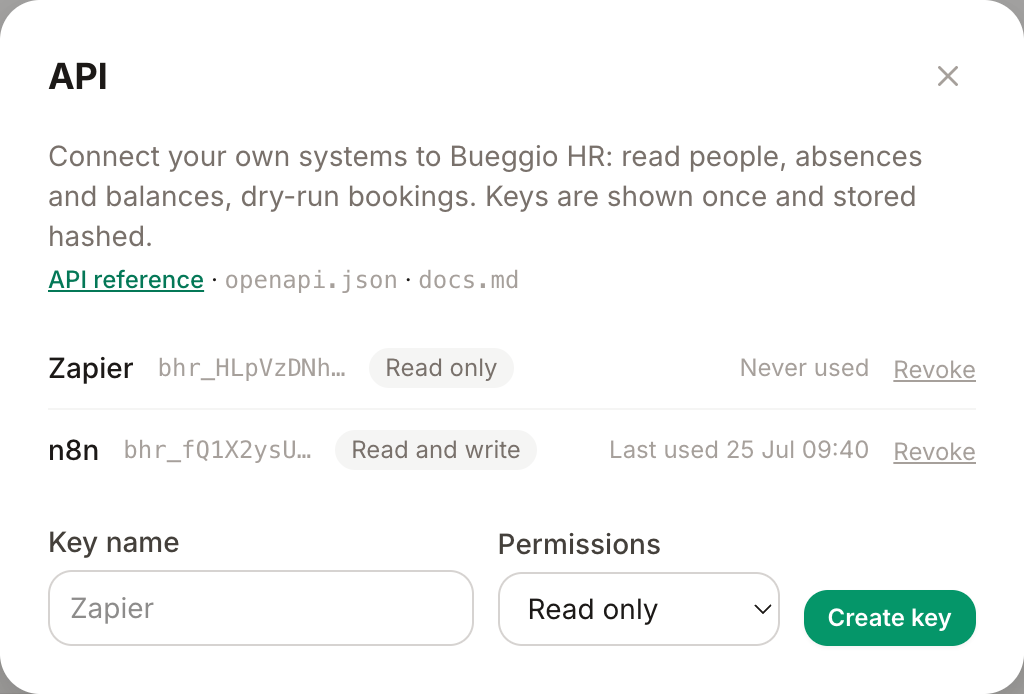
- Go to Settings → Integrations → API.
- Give the key a label that says where it will be used ("Zapier", "Payroll export"…).
- Pick the scope: Read only or Read and write. Start with read only unless you know you'll write.
- Click Create key and copy the key immediately — it's shown once and stored only as a hash. If you lose it, revoke it and create a new one.
Make your first request
Authenticate every call with the key as a Bearer token:
curl https://www.bueggiohr.eu/api/v1/whos_off \
  --header "Authorization: Bearer bhr_..."
Three places to learn the surface:
- API reference — human-readable docs for every endpoint.
-
/api/v1/openapi.json— the OpenAPI spec, for generating clients and testing tools. -
/api/docs.md— the whole reference as one Markdown file, handy to paste into an AI assistant.
What's in the API
- Read — organization, people, departments, leave types, public holidays, absences, per-person allowances and balances, who's off on a date range.
- Quote — a dry run of a booking: how many days it would deduct and any conflicts, without creating anything.
- Write (read-write scope) — create leave requests, approve, decline, cancel. Bookings follow the same rules as the app: approval flows, date locks and absence caps all apply, and everything lands in the request's audit trail.
- Webhooks management — register and remove webhook endpoints programmatically.
Keep keys safe
- Treat a key like a password: it grants access to your whole organization's leave data.
- Use one key per system, labelled clearly — the list shows when each key was last used, so stale ones are easy to spot and revoke.
- Revoke immediately if a key leaks; integrations using it stop working the moment you do.
Troubleshooting
-
401 invalid_api_key — the header must be exactly
Authorization: Bearer bhr_...; check the key wasn't revoked. - 403 on a write — the key's scope is read only; create a read-write key.
- A booking is rejected — the API enforces the same rules as the app (date locks, absence caps, allowances). The error message says which rule refused it.