Leave types and carry forward
Create the types your team books — colors, allowance deduction, approval, attachments, absence caps — and decide how unused days carry into next year.
Leave types are the vocabulary of your leave tracking: Holiday, Sick leave, Remote work, Business trip… Each type carries a few switches that decide how bookings of that type behave — whether they consume the allowance, whether a human must approve them, whether proof is required. Configure them in Settings → Leave types.
Create or edit a type
Click Add leave type (or Edit on an existing one) and set:
- Name — what people pick when booking.
- Color — how it shows on the wall chart and in every badge. Pick distinct colors; the chart is read at a glance.
- Deducts from allowance — on for real vacation, off for types tracked separately (sickness, remote work). Non-deducting types get their own optional per-person yearly counters in Settings → Team.
- Requires approval — on = requests wait for an approver; off = auto-approved the moment they're booked (a good fit for remote work).
- Requires attachment — the booking form demands a file upload, typically a medical certificate. The attachment is visible to approvers and treated as sensitive data.
- Requires certificate number — asks for an official certificate number instead of (or alongside) a file; built for Italy's INPS sick-leave certificates.
- Counts toward the absence limit — when a department has a max-away cap, bookings of this type take up a slot. Leave it off for types that shouldn't block others (remote work, sickness). More in the departments guide.
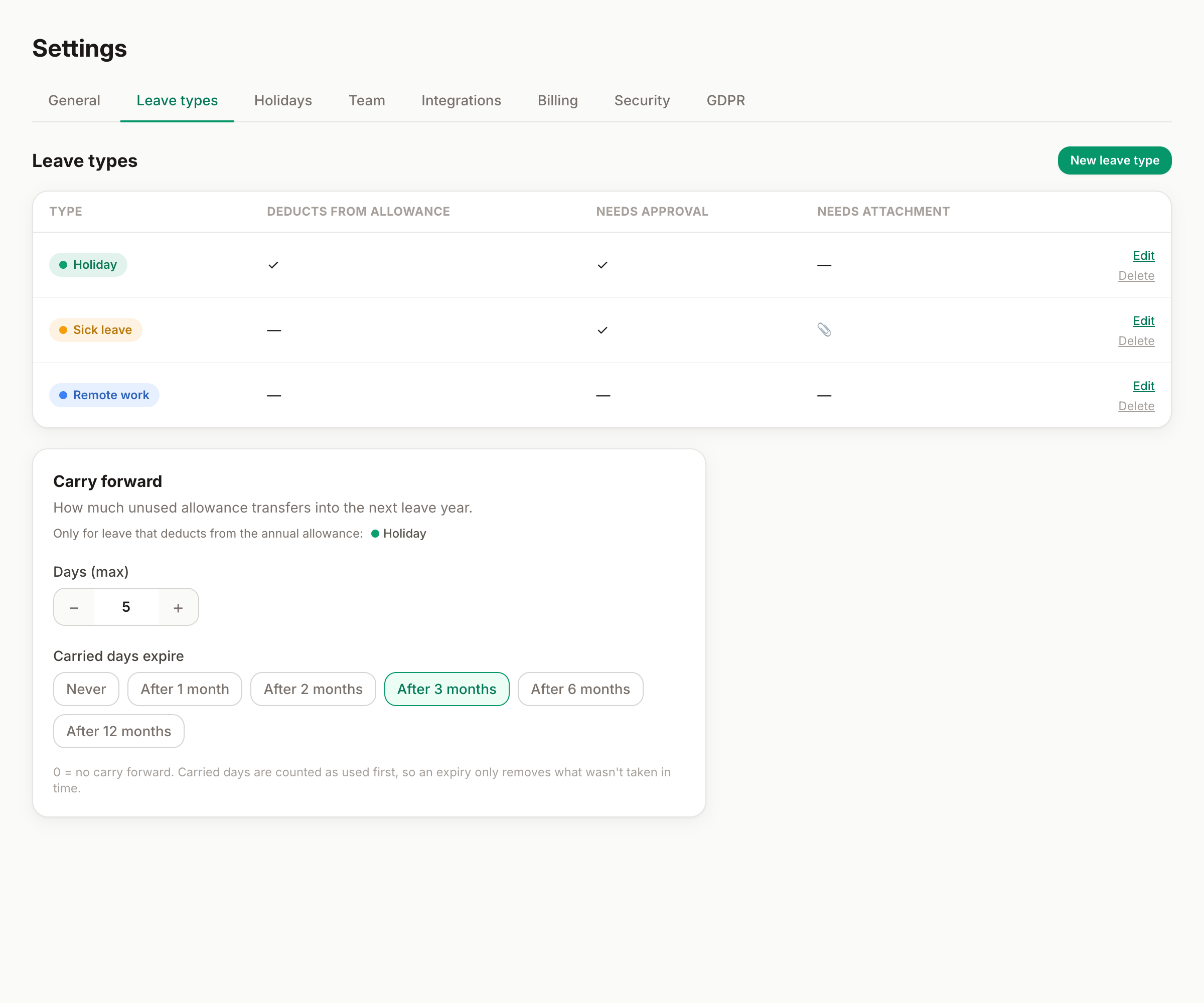
Carry forward
At the bottom of the page, decide what happens to unused allowance at the end of the leave year:
- Days — how many unused days can travel into the next year. 0 means no carry forward; half days are allowed.
- Expiry — carried days can last forever, or expire 1, 2, 3, 6 or 12 months into the new year. With a March expiry (3 months), "use them or lose them" has a real deadline.
Two details that keep it fair: carry forward only applies to types that deduct from the allowance, and carried days are spent first — an expiry only removes what genuinely wasn't taken in time.
Deleting a type
Deleting a leave type is confirmed before it happens. If the type has history you'd rather keep readable, consider renaming or repurposing it instead of deleting.
A sensible starter set
| Type | Deducts | Approval | Notes |
|---|---|---|---|
| Holiday | ✓ | ✓ | The main allowance |
| Sick leave | — | ✓ | Attachment or certificate number if you need proof |
| Remote work | — | — | Auto-approved, doesn't block others |
| Business trip | — | ✓ | Visible on the chart, no allowance cost |