Read the wall chart
One month, everyone's absences: colors, pending hatching, filters, density and what each role can see.
For everyone
Updated October 09, 2026
The wall chart is the heart of Bueggio HR: one month, everyone's absences, at a glance. Once the team is in, it answers the daily questions by itself — who's off today, is next week safe for the launch, when does Anna come back.
Reading it
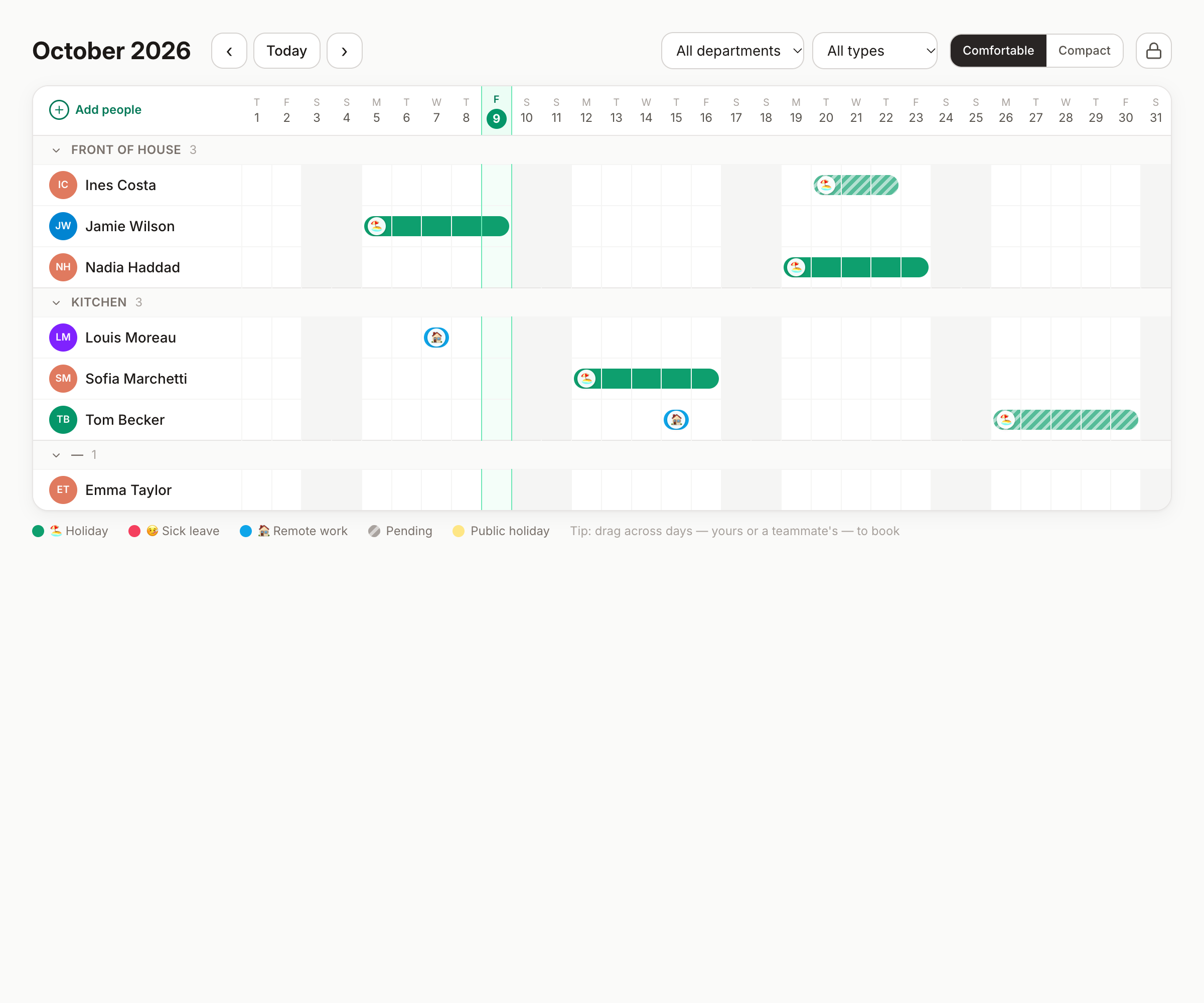
- One row per person, grouped by department; one column per day. Weekends and public holidays are shaded (hover a holiday for its name).
- Colored bars are absences — the color is the leave type, matching the legend at the bottom. When a type has an emoji, it shows as a small sticker on the first day of the bar.
- Hatched bars are pending requests: visible so nobody double-books a period, but not decided yet.
- Shaded stripes with a label are date locks — periods where new bookings are refused.
Moving around
- ‹ › and Today — month by month, and straight back to now.
- Filters — one department, one leave type, or both. The URL keeps your filters, so a bookmarked view stays filtered.
- Density — comfortable or compact; compact fits big teams on one screen.
- Clicking a bar opens the request's detail — including its timeline, and the decision buttons if it's pending and yours to decide.
Booking from the chart
Two ways, both fast:
- Drag across days on your own row — the booking form opens with those dates already picked. Every cell splits at noon — hovering previews the half you're about to grab: take the right half to start at lunchtime, release on a left half to be back after lunch. Approvers can drag on a teammate's row to book on their behalf.
- The Book time off button, for when you'd rather start from the form (booking guide).
Who sees what
By default the whole company sees the whole chart. Organizations that prefer discretion can restrict visibility to departments — that's an admin setting, explained in the security guide. Whatever the policy, allowances and balances stay personal: the chart shows when people are away, not their counters.
Good to know
- With large teams the chart loads department groups progressively — nothing to configure, it just stays fast.
- Each person's row respects their own holiday country: a teammate in another country shows their holidays, not yours.
- Admins can click a name to open that person's year calendar — and from there, the heading opens their card in Settings.
- Prefer it in your calendar app? Subscribe to the department feeds.
Can't find what you're looking for?
Write to us: a human replies within 48 hours.
Contact us