Create your organization
Sign up in two steps, see what the country defaults set up for you, and follow the first-steps checklist until the wall chart comes to life.
From zero to a working leave tracker takes one afternoon — most teams need much less. This guide walks the first hour: create the organization, let the country defaults do their work, and follow the built-in checklist until the wall chart comes to life.
Sign up
Go to the signup page and fill in two short steps:
- Company and account — company name, your name, work email and a password. This makes you the organization's first admin.
- About your company — country, team size, and what you used before. The country matters: it decides which public-holiday calendar you can import and switches on the country rules that apply to you (ROL hours in Italy, RTT in France, convenio extras in Spain).
The trial is 1 month, free, no credit card — everything included. You'll get a verification email; confirm it when convenient.
What's already set up for you
A fresh organization isn't empty:
- Three leave types — Holiday (deducts from the allowance), Sickness and Remote work (tracked separately). Rename, recolor or extend them any time in Settings → Leave types.
- Country defaults — the leave rules of your country, pre-configured with sensible values you can override later.
- A Monday–Friday working week — change it in Settings → General if you work differently.
Follow the first-steps checklist
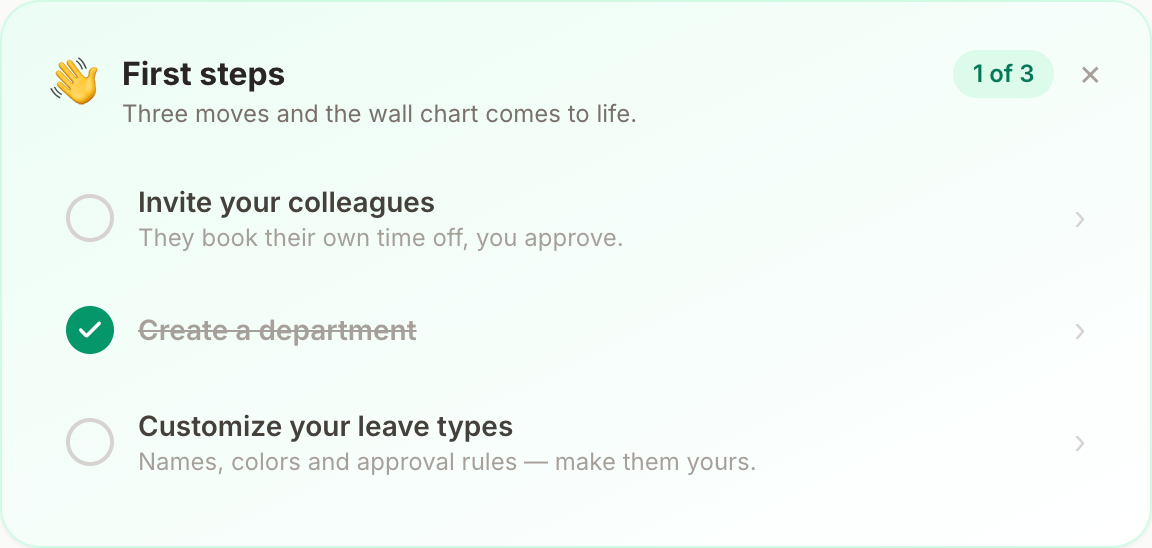
On the wall chart, admins see a First steps card — three moves and the chart comes to life:
- Invite your colleagues — they book their own time off, you approve (how to invite).
- Create a department — group people and pick who approves their requests (departments guide).
- Customize your leave types — names, colors and approval rules, made yours.
The card tracks your progress and disappears when you're done (or when you dismiss it).
Two five-minute jobs worth doing early
- Import your public holidays — Settings → Holidays, one click per year (holidays guide). Without them, the engine can't skip them when counting leave.
- Check the working week — if Saturdays are working days for you, tick them before people start booking.
Where to go next
- Book your own first request to see the flow end to end — booking guide.
- Put Bueggio HR where your team already lives: Slack, calendars, the mobile app.
Can't find what you're looking for?
Write to us: a human replies within 48 hours.
Contact us